


301 vs 302 Redirect: Differences, SEO Impact & When to Use Each

A 301 redirect means a page has moved permanently: Google indexes the new URL and its ranking signals move there. A 302 redirect means the move is temporary: Google usually keeps the old URL in its index and the old page keeps its rankings. Visitors land on the new URL either way. Use a 301 for domain changes, site migrations and renamed or merged pages; use a 302 only when the original URL is coming back, such as during maintenance, a short campaign or a test.
Both status codes send people to the same place, so the difference is easy to miss until rankings move to the wrong URL or a temporary detour gets stuck in browsers' caches. This guide covers what each code tells Google and browsers, when to use which, how to check what a URL returns today, and how to set either one up.
What is a 301 redirect?#
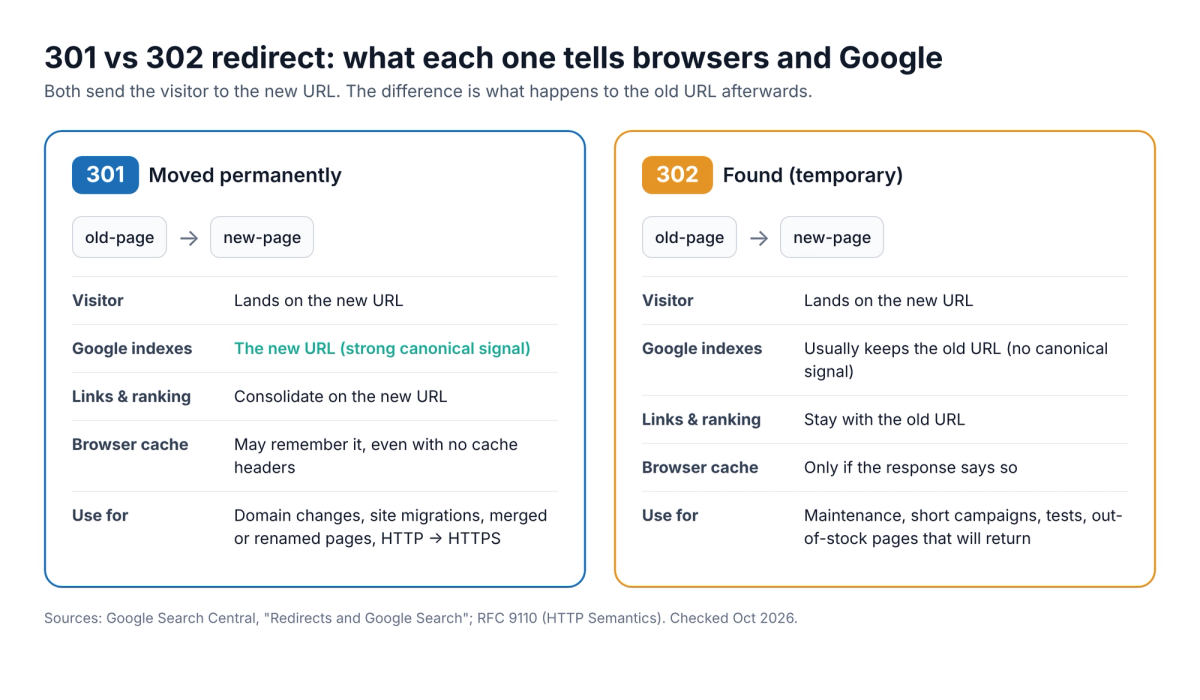
A 301 (Moved Permanently) tells browsers and search engines that a URL has a new, permanent home. According to Google's documentation on redirects, Google uses a permanent redirect as a signal that the target URL should be the canonical one, so the new URL replaces the old one in search results over time and links pointing at the old URL count toward the new one.
What is a 302 redirect?#
A 302 (Found) tells them the content is somewhere else for now and the original URL is still the real address. Google follows the redirect but does not use it as a canonical signal, so the old URL usually stays indexed. That is exactly what you want for a short detour, and exactly what you don't want for a move that is never going back.
301 vs 302: the differences that matter#
| 301 redirect | 302 redirect | |
|---|---|---|
| Meaning | Moved permanently | Found, moved temporarily |
| What Google indexes | The new URL | Usually the old URL |
| Links and ranking signals | Consolidate on the new URL | Stay with the old URL |
| Browser caching | Cacheable by default, so browsers may remember it | Only cached if the response says so |
| Changing your mind later | Hard: browsers that cached it keep going to the new URL | Easy: remove or change it at any time |
| Typical uses | New domain, site migration, renamed or merged pages, HTTP to HTTPS | Maintenance, short campaigns, A/B tests, items temporarily out of stock |
The caching row comes from the HTTP standard: RFC 9110 defines 301 and 308 responses as cacheable by default, while 302 and 307 are only cached when the server sends explicit cache headers. In practice that means a mistaken 301 can stick in visitors' browsers after you fix it on the server.
How Google treats 301 and 302 redirects#
- •Permanent codes (301, 308) are a strong canonical signal. Google treats the target as the URL to index. An instant meta refresh and a JavaScript redirect are also read as permanent, but Google recommends server-side redirects where you can use them.
- •Temporary codes (302, 303, 307) are not. Google follows them, but the target is only indexed if other signals point to it.
- •Neither type wastes PageRank. Google's Gary Illyes said in 2016 that 30x redirects no longer lose PageRank (reported by Search Engine Land). The choice between 301 and 302 is about which URL Google shows, not about losing value in the hop.
- •A long-running 302 may be read as a 301, but don't count on it. Ahrefs notes that Google can start treating a 302 that never goes away as permanent, with no fixed timeline. If the move is permanent, say so with a 301.
- •Keep redirects for at least a year. For site moves, Google's site move guide advises keeping redirects as long as possible, generally at least one year, and redirecting straight to the final URL rather than through a chain.
When to use a 301 redirect#
- •You moved to a new domain or merged two sites.
- •You changed your URL structure, for example /blog/post to /articles/post.
- •You combined several thin pages into one stronger page.
- •You renamed a page or product and the old URL will not come back.
- •You switched from HTTP to HTTPS, or from www to the root domain (or the other way round).
When to use a 302 redirect#
- •The site or a page is down for maintenance and will return.
- •A seasonal or campaign URL should point at an offer for a few weeks.
- •You are testing a new page with part of your traffic before deciding.
- •A product is out of stock and its page will be back.
If you can't decide, ask one question: will the old URL ever show its own content again? If not, use a 301.
What about 307 and 308?#
They are the stricter versions of 302 and 301. A 307 is temporary and a 308 is permanent, but both forbid the browser from changing the request method, so a form POST stays a POST. With a 302, browsers switch a POST to a GET, as MDN explains. For ordinary pages and domains, 301 and 302 are the usual choice; use 307 or 308 for API endpoints and forms. Google groups 308 with 301 and 307 with 302.
What redirects look like in practice#
Most redirects are permanent moves. Of the redirects set up on RedirHub, about 96 in 100 use a 301, and around one account in seven has set up a 302 at least once (RedirHub platform data, October 2026). So the 302s that do exist are worth a second look: some are real temporary detours, others are permanent moves set up with the wrong code.
Common 301 and 302 mistakes#
- •Using a 302 for a permanent move. The old URL can stay in search results and the new one never takes over.
- •Using a 301 for a temporary detour. Browsers may cache it, so visitors keep landing on the detour after you switch back.
- •Redirect chains. A to B to C adds a round trip per hop. Point A straight at C.
- •Sending every old URL to the home page. Visitors lose the page they wanted. Map each old URL to its closest new page.
- •Removing redirects too early. Old links and bookmarks keep arriving for years; keep redirects for at least a year.
- •Leaving internal links on the old URLs. Update your own links and sitemap to the new URLs so nothing depends on the redirect.
How to check whether a URL returns a 301 or a 302#
- Open a terminal and run
curl -I https://old-url.com/page. - Read the first line: it shows the status code, such as HTTP/2 301 or HTTP/2 302.
- Read the location header: it shows where the redirect points.
- To see every hop and the response time from several regions, enter the URL in our redirect speed test.
Is your redirect working?
Enter your domain. You'll see the status code (301 or 302), where it lands, whether HTTPS is valid, and how fast it answers from Washington, Frankfurt and Tokyo, ranked against every redirect tested in the last 7 days.
Test my redirectHow to find and fix a 302 that should be a 301#
- List the redirects that return a 302, using the check above or a site crawler.
- For each one, ask whether the old URL will ever show its own content again. If it won't, it should be a 301.
- In Google Search Console, inspect the old URL with the URL Inspection tool. If the Google-selected canonical is still the old URL, Google is treating the move as temporary.
- Change the redirect to a 301 where it is set up: your server config, your registrar's forwarding setting, or in RedirHub by opening the redirect and choosing 301 · Permanent under Redirect type.
- Point your internal links and sitemap at the new URL, then check again with the redirect test above.
Google picks the change up when it next crawls the old URL, so give it a few weeks before judging the result.
How to set up a 301 or 302 redirect#
If you run your own web server, add the redirect in its configuration. Swap 301 for 302 to make it temporary:
| Server | 301 (permanent) | 302 (temporary) |
|---|---|---|
| Apache (.htaccess) | Redirect 301 /old-page https://example.com/new-page | Redirect 302 /old-page https://example.com/new-page |
| Nginx (inside the location block) | return 301 https://example.com/new-page; | return 302 https://example.com/new-page; |
Website builders and domain registrars usually offer a forwarding setting instead, where you pick Permanent (301) or Temporary (302). That works well for a single page or domain.
With RedirHub#
RedirHub redirects domains and URLs without a web server. You only point the domain's root and www records at RedirHub; your DNS and email stay where they are.
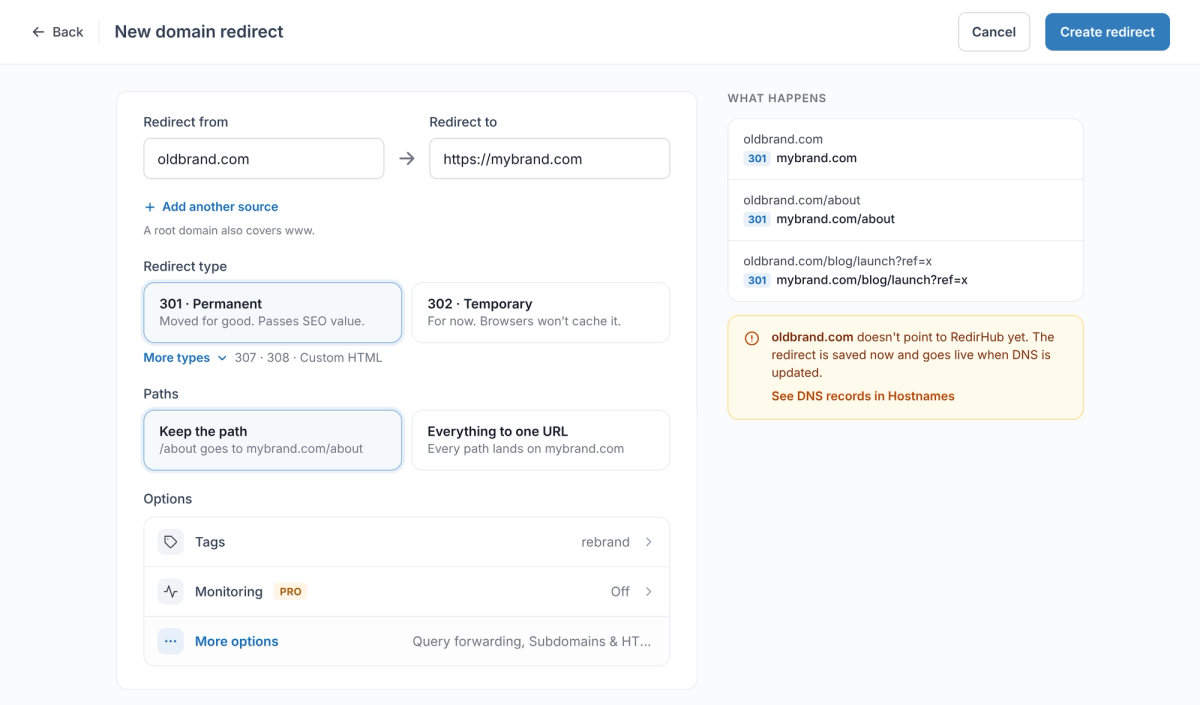
- In the dashboard, start a new Domain Redirect.
- In Redirect from, enter the old domain or URL, for example oldbrand.com. A root domain also covers www.
- In Redirect to, enter the new address, for example https://mybrand.com.
- Under Redirect type, choose 301 · Permanent or 302 · Temporary. More types holds 307 and 308.
- Under Paths, choose Keep the path (oldbrand.com/about goes to mybrand.com/about) or Everything to one URL. What happens previews the result.
- Click Create redirect.
- Connect the domain: in Hostnames, open Connect DNS, add the records shown for the root and www at your DNS provider, then click I've made the changes.
- Wait for the check to pass, or click Check now. The redirect goes live once the records are found, and HTTPS is issued for both root and www.
Server redirect vs RedirHub#
| Server or registrar redirect | RedirHub | |
|---|---|---|
| Redirect types | Usually 301 and 302 | 301, 302, 307, 308 and frame redirects |
| Where it answers | Your server or the registrar's forwarding service | 130 global edge locations (PoPs), close to each visitor |
| DNS and email | Often tied to the registrar's nameservers | Stay where they are; only root and www records change |
| HTTPS | Your certificate, or depends on the registrar | Issued and renewed automatically for root and www |
| Paths and migrations | Rules you write and maintain | Keep the path, or map each old URL to its own new page; CSV import on every plan |
| Seeing if it is used | Server logs | Clicks and unique visitors with bots filtered out, top links per domain |
| Cost | Included with hosting or the domain | From $49/month (Core), 14-day free trial |
If you have one site on a server you control, or one domain your registrar forwards over HTTPS, a native redirect is free and enough. RedirHub is worth it when you redirect several domains, want the redirect to answer quickly worldwide, or need to see whether old URLs still get visitors.
For a website migration, you can map every old URL to its new page and load the list with a bulk CSV import instead of writing server rules by hand. Every connected domain gets automatic HTTPS, and RedirHub re-checks DNS every 10 minutes, so a redirect goes live as soon as your records are in place.
Frequently asked questions
Neither is better in general; they say different things. Use a 301 when the move is permanent so Google indexes the new URL and consolidates links there. Use a 302 when the old URL is coming back, so it keeps its place in search results.
Not when the move really is temporary: the original URL keeps its rankings. It becomes a problem when a 302 is used for a permanent move, because Google may keep showing the old URL instead of the new one.
Yes. If a temporary move becomes permanent, switch it to a 301 so Google treats the new URL as the main one. Going the other way is harder, because browsers may have cached the 301.
Inspect the old URL with the URL Inspection tool in Google Search Console. If the Google-selected canonical is the new URL, Google is already treating the redirect as permanent; if it is still the old URL, it is treating it as temporary. If the move is permanent, change the redirect to a 301 rather than waiting.
Google's site move guidance says to keep redirects as long as possible, generally at least one year. Many sites keep them indefinitely so old links and bookmarks keep working.
No. Google said in 2016 that 30x redirects no longer lose PageRank. What matters is pointing each old URL at a relevant new page and avoiding redirect chains.
Both are temporary. A 307 guarantees the browser repeats the same request method, so a POST stays a POST; after a 302, browsers turn a POST into a GET. For normal page and domain redirects, a 302 is fine.
Yes. You choose 301 or 302 under Redirect type when you create a redirect, with 307, 308 and frame redirects also available, and you can change the type later.

TC is the Operations Manager at RedirHub, leading the company’s operational strategy and execution to ensure reliable, scalable redirect infrastructure. He oversees internal processes, cross-team coordination, and platform readiness while supporting customers through complex redirect implementations. With a strong understanding of large-scale domain operations and real-world edge cases, TC plays a key role in aligning product and customer success to deliver stable, high-performance redirection solutions.