



API tokens let scripts and other services use the RedirHub API on your behalf. Each token works for one workspace and acts with your role there, so a token can do what you can do in that workspace. API tokens are available on every plan.
Step 1: Open API tokens#
Open your account settings and click API tokens. The list shows each token’s name, workspace, when it was last used and when it expires.
Step 2: Create a token#
- Click Create token.
- Give it a name you will recognise, such as the service that will use it.
- Choose the workspace it works for.
- Choose when it expires: no expiration, 30, 60, 90 or 180 days, or 1 year.
Step 3: Copy the token#
The token is shown in full only once, right after you create it. Click Copy token and keep it somewhere safe, such as a password manager or your service’s secret store. Send it with every request in the header Authorization: Bearer <token>.
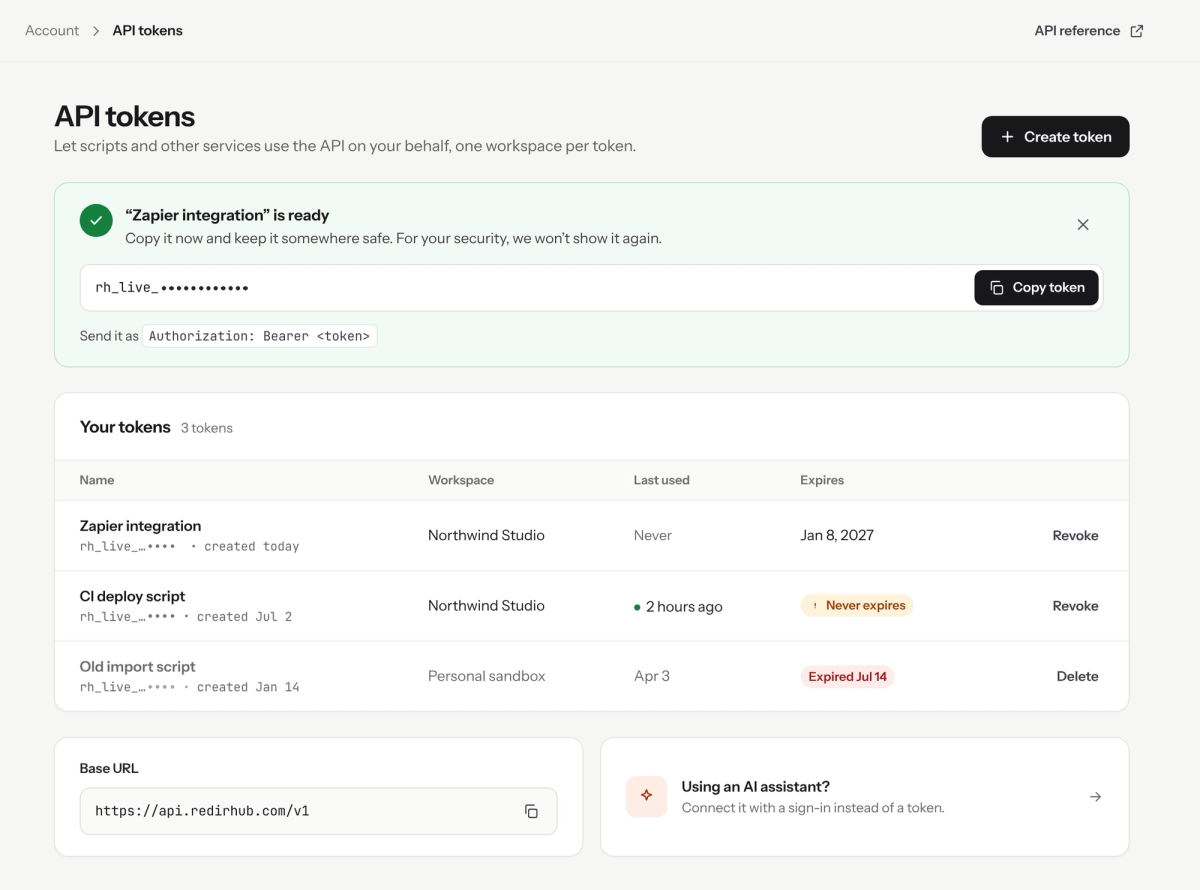
A new token is shown in full only once. Copy it right away.
Anyone with the token can use the API with your role in that workspace. Never share it in chat, email or public code.
Step 4: Revoke tokens you no longer need#
Click Revoke next to a token to stop it working, for example when a service is retired or a token may have leaked. Expired tokens are marked in the list and can be deleted.
Good to know#
- If you lose a token, create a new one and revoke the old one. A token can’t be shown again.
- Prefer an expiry date. A token that never expires is flagged in the list.
- Endpoints, examples and the base URL are in the API reference.
- AI assistants don’t need a token: they connect to the RedirHub MCP server at https://mcp.redirhub.com with a sign-in.