


To forward a GoDaddy domain, open your Domain Portfolio, select the domain, go to DNS > Forwarding and choose Add Forwarding. Enter the destination URL, pick Permanent (301) for a lasting move, and save. GoDaddy applies HTTPS automatically. Most changes work within an hour, some take up to 48 hours.
GoDaddy's built-in forwarding is free and works well for sending one domain to one address. This guide covers the setup steps, how to choose the forwarding type, what GoDaddy changes in your DNS when you save, and fixes for the most common problems. If you need more than one destination per domain, many domains, or want to keep DNS at another provider, the last section shows how to forward through RedirHub while the domain stays at GoDaddy.
How to set up GoDaddy domain forwarding#
These steps follow GoDaddy's own help article. GoDaddy now applies HTTPS automatically when you forward this way.
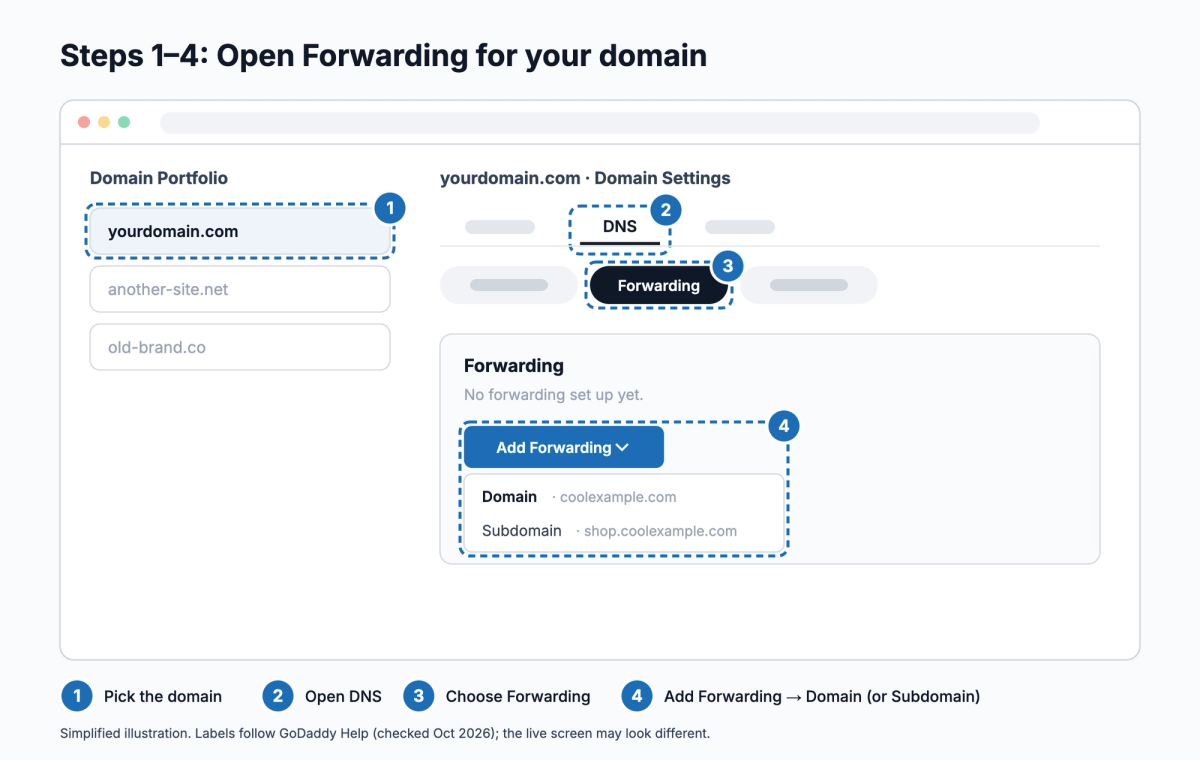
- Sign in to your GoDaddy Domain Portfolio and select the domain to open its Domain Settings page.
- Select DNS.
- Select Forwarding.
- Select Add Forwarding and choose Domain (the root, such as yourdomain.com) or Subdomain (such as shop.yourdomain.com). For a subdomain, enter its name; GoDaddy creates it if it doesn't exist yet.
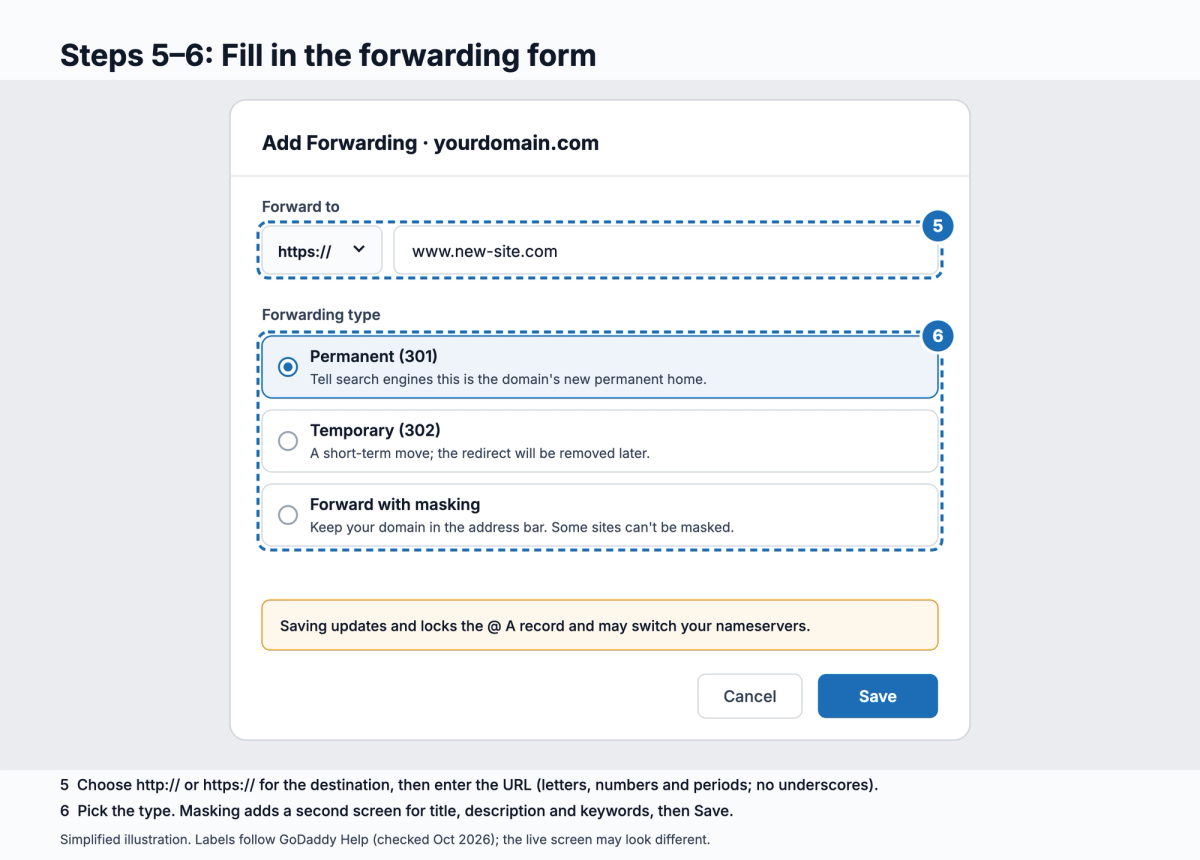
- Choose http:// or https:// for the destination and enter the URL. It can use letters, numbers and periods, up to 1,000 characters, but not underscores.
- Choose the forwarding type: Permanent (301), Temporary (302) or Forward with masking. Masking adds a screen where you enter a title, description and keywords.
- Select Save. If the domain has Domain Protection, GoDaddy asks for a verification code first.
- For www to forward too, check that the www CNAME record points to @.
Is your forward working?
Enter your domain. You'll see the status code (301 or 302), where it lands, whether HTTPS is valid, and how fast GoDaddy answers from Washington, Frankfurt and Tokyo, ranked against every redirect tested in the last 7 days.
Test my redirectMost DNS changes take effect within an hour but can take up to 48 hours. GoDaddy shows progress in the Propagation column of the DNS records list.
Which forwarding type should you choose?#
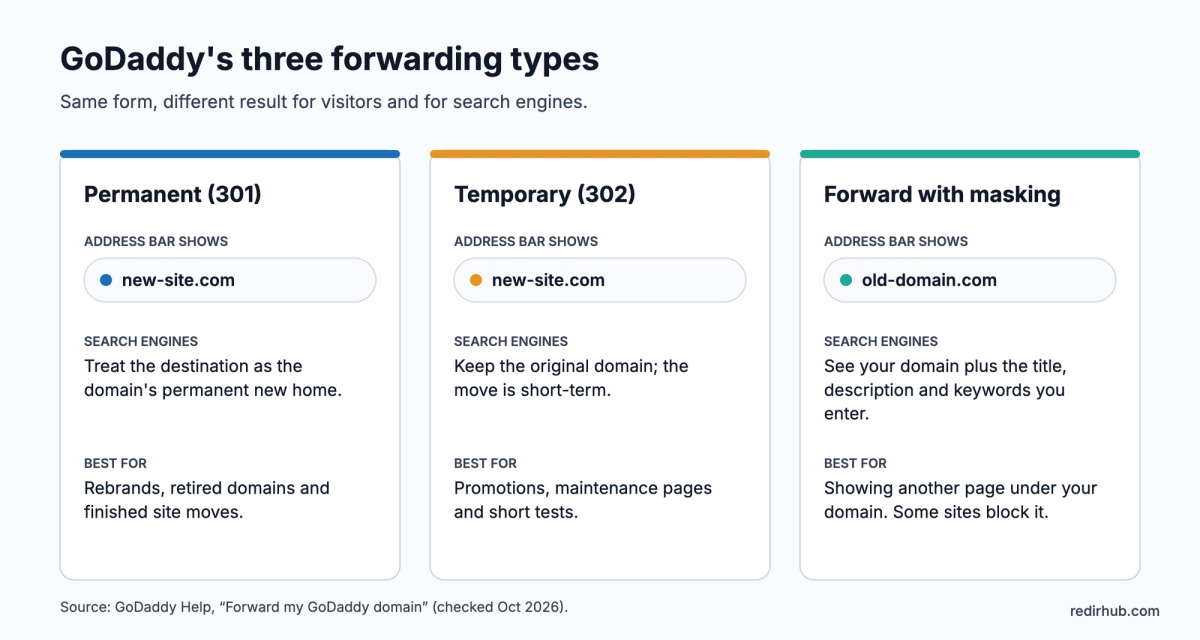
Permanent (301) is the right choice for most moves, such as a rebrand or a retired domain: it tells search engines the destination is the domain's new home.
Temporary (302) is for short-term moves you plan to undo, such as a promotion or a maintenance page.
Forward with masking keeps your domain in the address bar while showing the destination. Some websites refuse to be shown this way and display a blank page; if that happens, switch to 301 or 302.
What GoDaddy changes when you save forwarding#
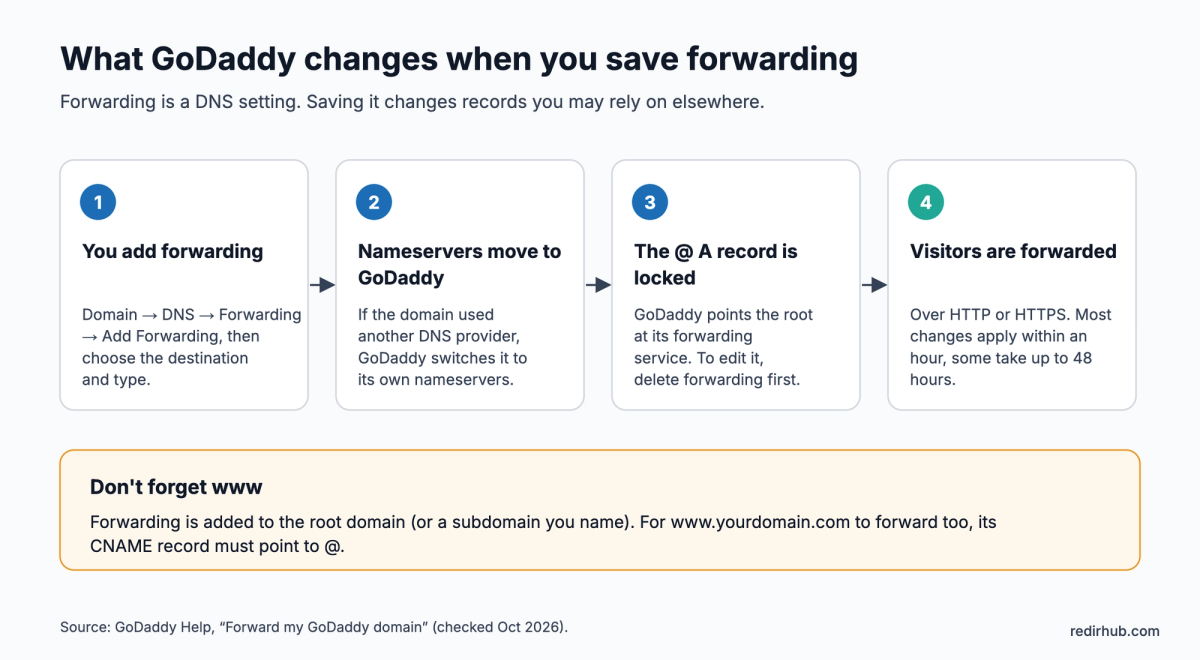
- Nameservers: if the domain uses another DNS provider, GoDaddy switches it to GoDaddy nameservers. Records you kept at that provider stop applying.
- The @ A record: GoDaddy updates it and locks it. To change it later, delete forwarding first.
- www: forwarding covers the root or the subdomain you entered. www follows only if its CNAME points to @.
GoDaddy forwarding not working? Check these in order#
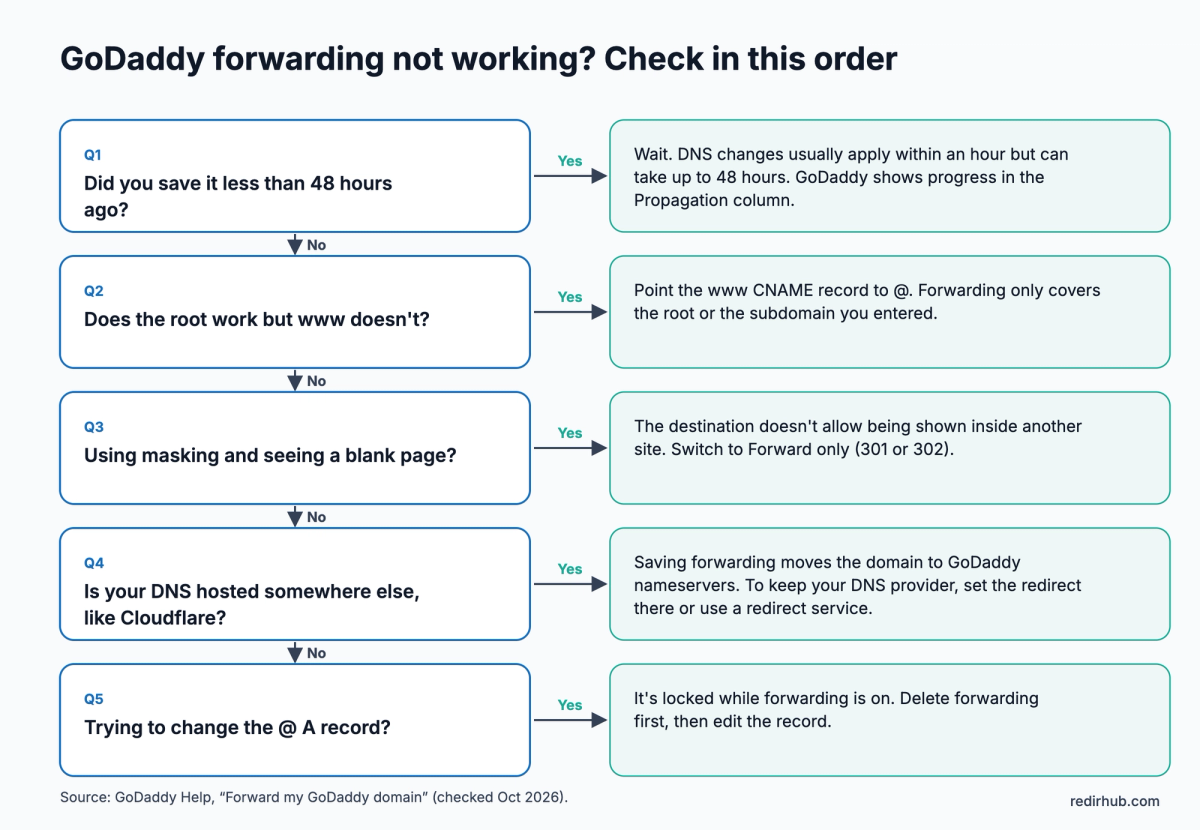
- Saved less than 48 hours ago? Wait, and check the Propagation column.
- Root works but www doesn't? Point the www CNAME record to @.
- Blank page with masking? The destination doesn't allow it. Switch to Permanent (301) or Temporary (302).
- DNS hosted elsewhere, for example at Cloudflare? Saving forwarding moves the domain to GoDaddy nameservers. To keep DNS where it is, set the redirect at that provider or use a redirect service.
- Can't edit the @ A record? It's locked while forwarding is on. Delete forwarding first.
When GoDaddy forwarding isn't enough#
GoDaddy Forwarding is free and fine for one domain with one destination. It works per domain or subdomain, needs GoDaddy nameservers, and sends every visitor to the same address. Here is how that compares with forwarding the same domain through RedirHub, while the domain stays registered at GoDaddy.
| GoDaddy Forwarding | RedirHub | |
|---|---|---|
| Network | Not published | Served from 130 global edge locations (PoPs), close to each visitor; in our test the redirect answered in about 16 ms from Washington, Frankfurt and Tokyo |
| DNS | Moves the domain to GoDaddy nameservers and locks the @ A record | DNS stays where it is; you add three records, and email (MX) keeps working |
| Old pages | Every page goes to the same destination | Keep the path (/about goes to the new /about), or send each old URL to its own new page during a site move |
| www and HTTPS | www needs its own CNAME to @ | One domain covers the root and www; HTTPS for both is issued and renewed automatically |
| Many domains | Set up one at a time in each domain's settings | All domains in one dashboard; several sources can share one redirect, and CSV import is on every plan |
| Redirect types | 301, 302 or masking | 301, 302, 307, 308 and frame |
| Clicks | Not shown on the forwarding screen | Clicks, unique visitors and top links per domain, with bots filtered out |
| Status | Check the Propagation column | RedirHub checks each DNS record, shows Connected, and keeps checking every 10 minutes |
| Price | Free with the domain | From $49/month (Core, 25 domains), 14-day free trial |
If one domain going to one address is all you need, stay with GoDaddy: it costs nothing. RedirHub is worth it once you move a site with changed URLs, run several domains, need visitors worldwide to be redirected quickly, or want to see whether the old domain still gets visitors. Try any domain in the redirect speed test to see how fast it answers from three continents.
Forward a GoDaddy domain with RedirHub instead#
Your domain, DNS and email stay at GoDaddy. If you turned on GoDaddy Forwarding earlier, delete it first, because both use the same @ A record. The whole setup takes about 10 minutes, plus time for DNS to update.
Before you start#
- The DNS for your domain is managed at GoDaddy. If your domain uses another provider's nameservers, make the changes there instead (how to check).
- A RedirHub account. The 14-day free trial is enough for this guide.
- About 10 minutes, plus time for DNS to update.
Step 1: Create the redirect in RedirHub#
In the RedirHub dashboard, choose Domain Redirect. Enter your GoDaddy domain under Redirect from and the new address under Redirect to. Pick 301 · Permanent for a lasting move, and under Paths choose Keep the path so old links land on the matching page, or Everything to one URL. The What happens panel shows where sample addresses will go. Use Add another source to send more domains to the same place, then click Create redirect. The redirect is saved right away and goes live once DNS points to RedirHub.
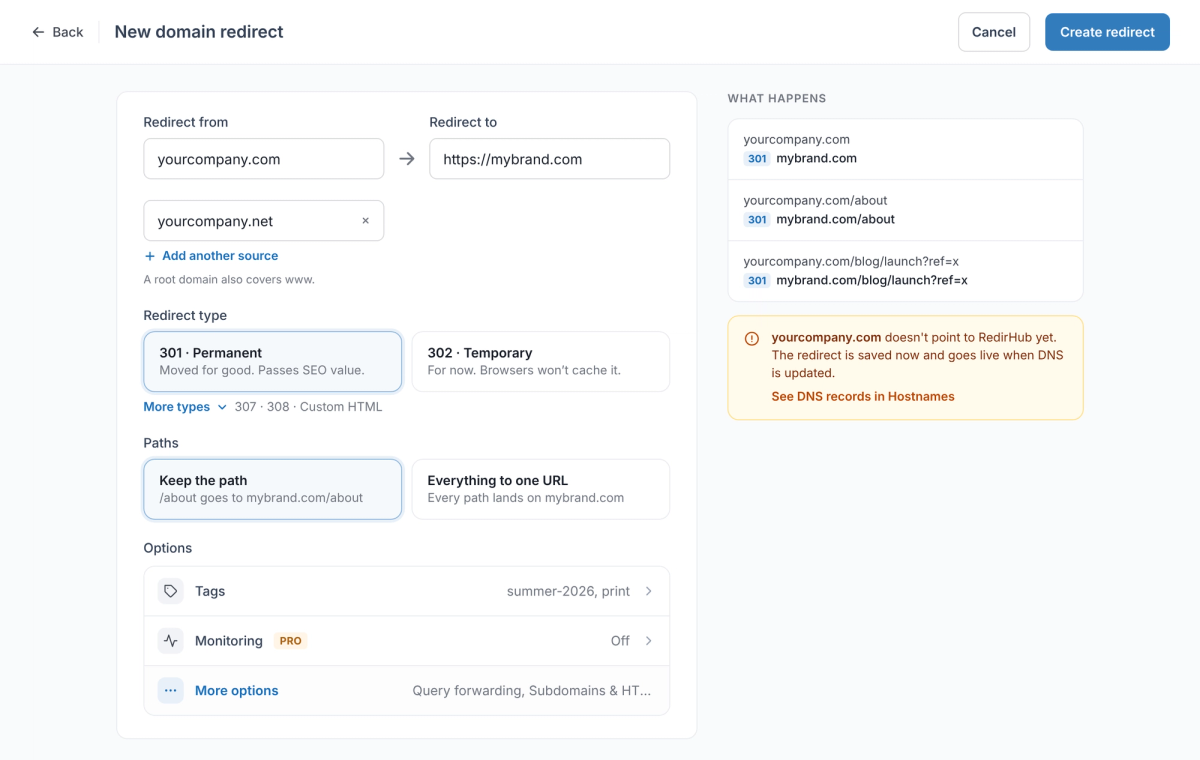
You don't need to add www separately. A redirect for the root domain also covers www, including the same paths, as long as www points to RedirHub in DNS.
Need more detail on these options? See Setting Up URL Redirects and Redirect Methods Explained.
Step 2: Open Connect DNS in RedirHub#
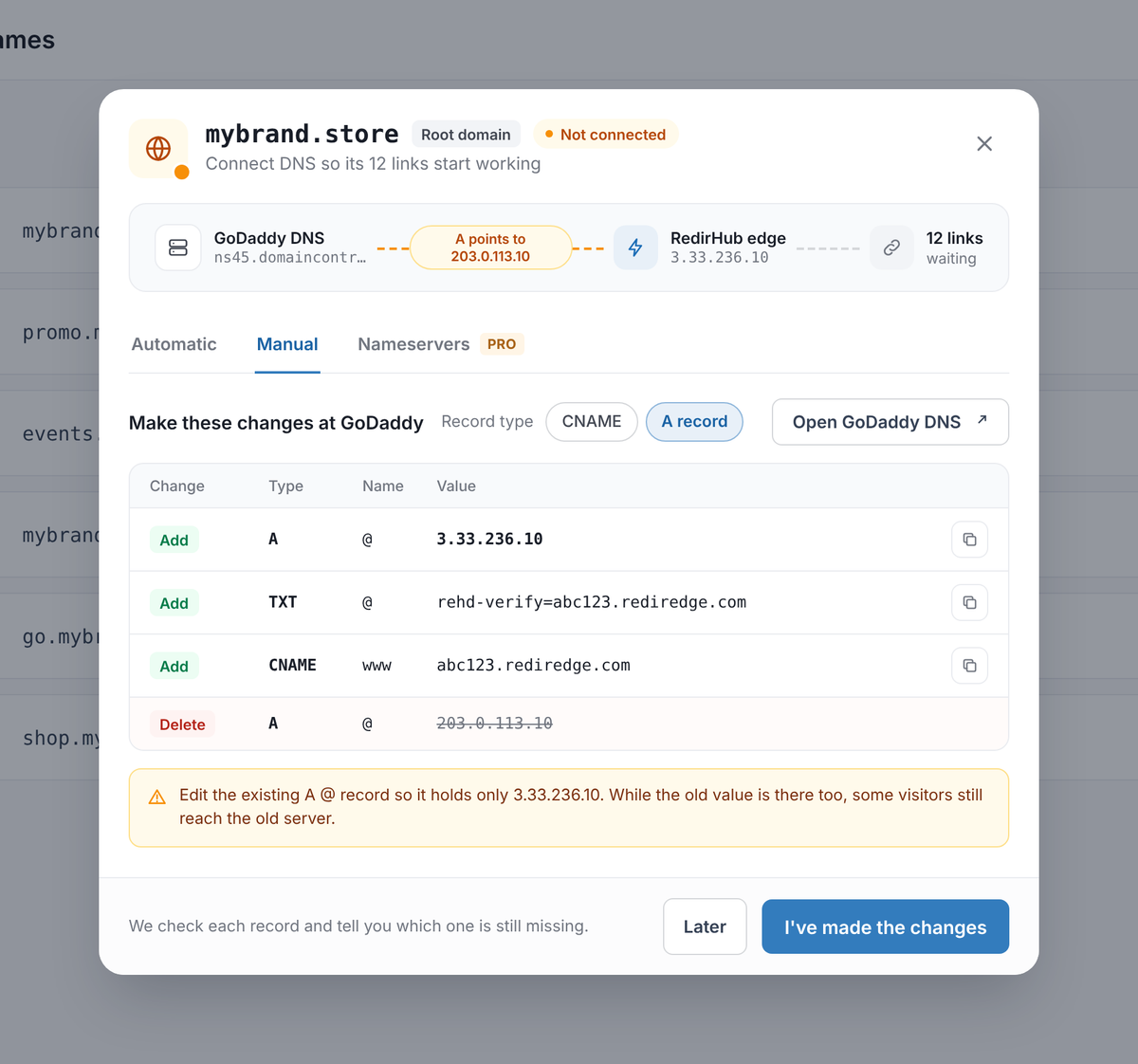
Click See DNS records in Hostnames, or open Hostnames, select the domain and click Connect DNS. GoDaddy doesn't support automatic setup yet, so use the Manual tab and set Record type to A record, because GoDaddy doesn't allow a CNAME on the root domain. RedirHub lists each record with a copy button, plus the old record to replace.
| Host | Type | Value |
|---|---|---|
| @ (root domain) | A | 3.33.236.10 |
| @ (root domain) | TXT | Your verification value, e.g. rehd-verify=abc123.rediredge.com |
| www | CNAME | Your CNAME target, e.g. abc123.rediredge.com |
Step 3: Update the DNS records at GoDaddy#
- Log in to GoDaddy, open your Domain Portfolio, select the domain and go to DNS.
- If the Forwarding tab shows a forward for the domain, delete it first.
- Under DNS Records, edit the A record for @ (often marked "Parked") and set the value to 3.33.236.10. Delete any other A or AAAA records for @.
- Add a TXT record: name @, value from your dashboard.
- Edit the CNAME record for www (by default it points to @) and set it to the value from your dashboard. Click Save.
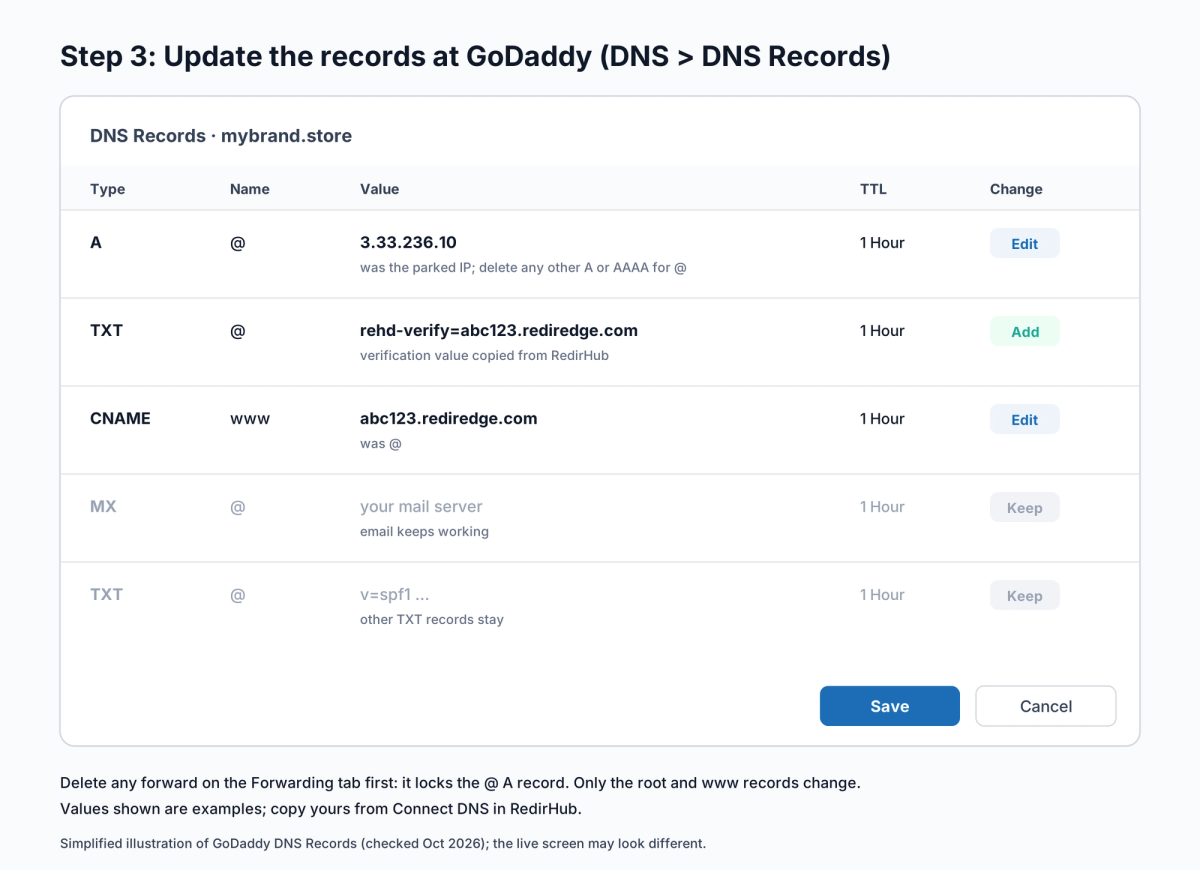
Only change A, AAAA and CNAME records for the root and www: your email (MX) and other TXT records keep working as before.
Step 4: Wait for Connected and HTTPS#
Back in RedirHub, click I've made the changes. RedirHub checks each record and tells you which one is still missing. Changes are often picked up within minutes but can take up to 24 hours, depending on the TTL of the old records; you can close the window and click Check now later. When the domain shows Connected, the redirect is live, and the HTTPS certificate for the root and www is issued automatically.
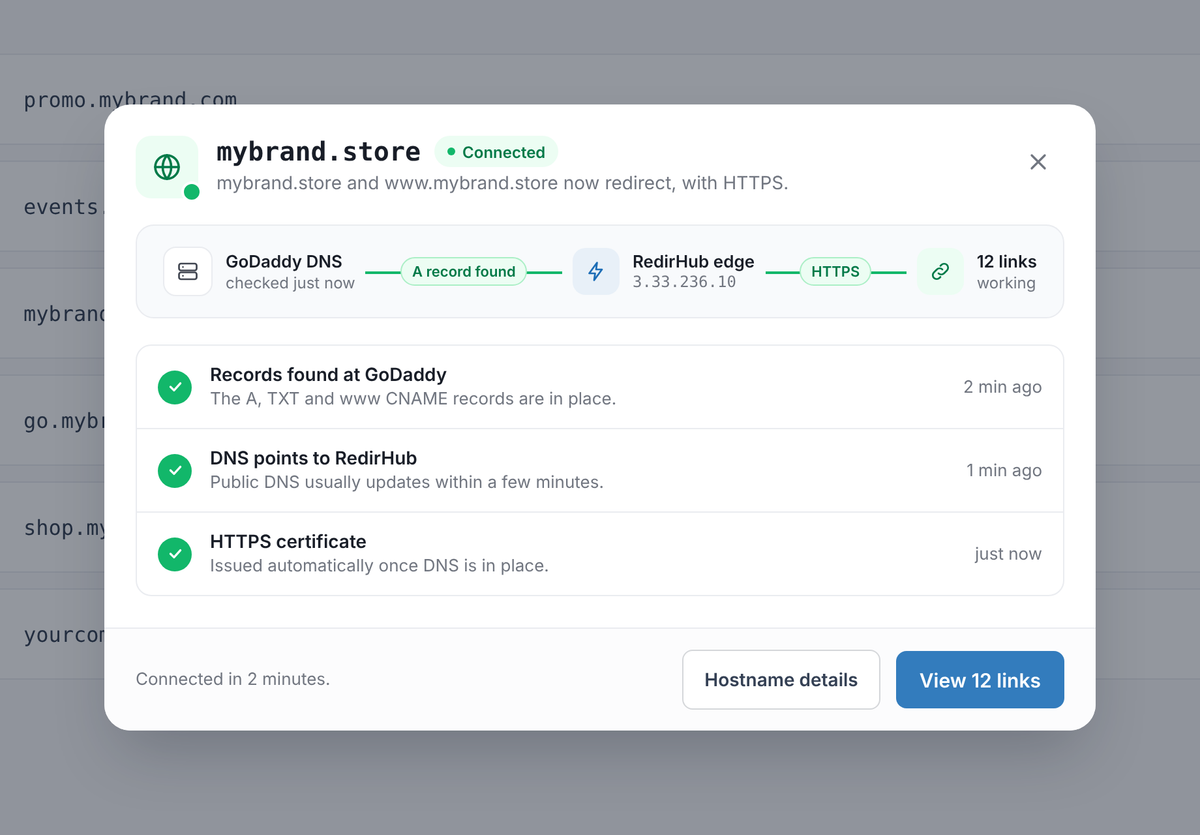
Step 5: Test the redirect#
Open your domain in a private browser window and check the homepage, a deeper page and the www version, over both http:// and https://. Or enter your domain in the redirect speed test to see the status code, destination, certificate and response time from three regions at once. If something doesn't work yet, see Troubleshooting new redirects or how long DNS changes take.
After it's live: check it in one place#
Open the domain in Hostnames to see its links, clicks over the last 30 days and when HTTPS renews. RedirHub keeps checking the GoDaddy records every 10 minutes, so you hear about it if someone changes them later.
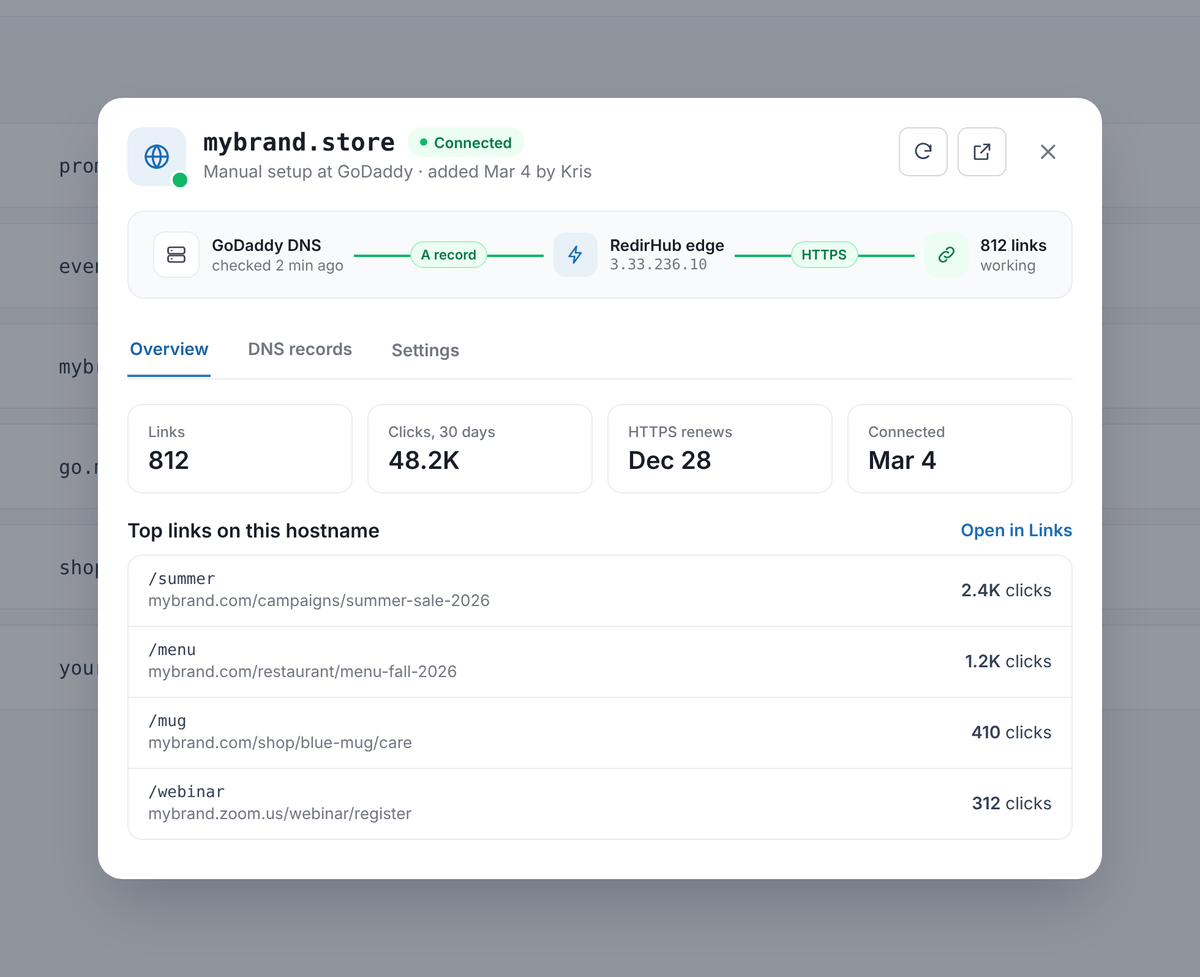
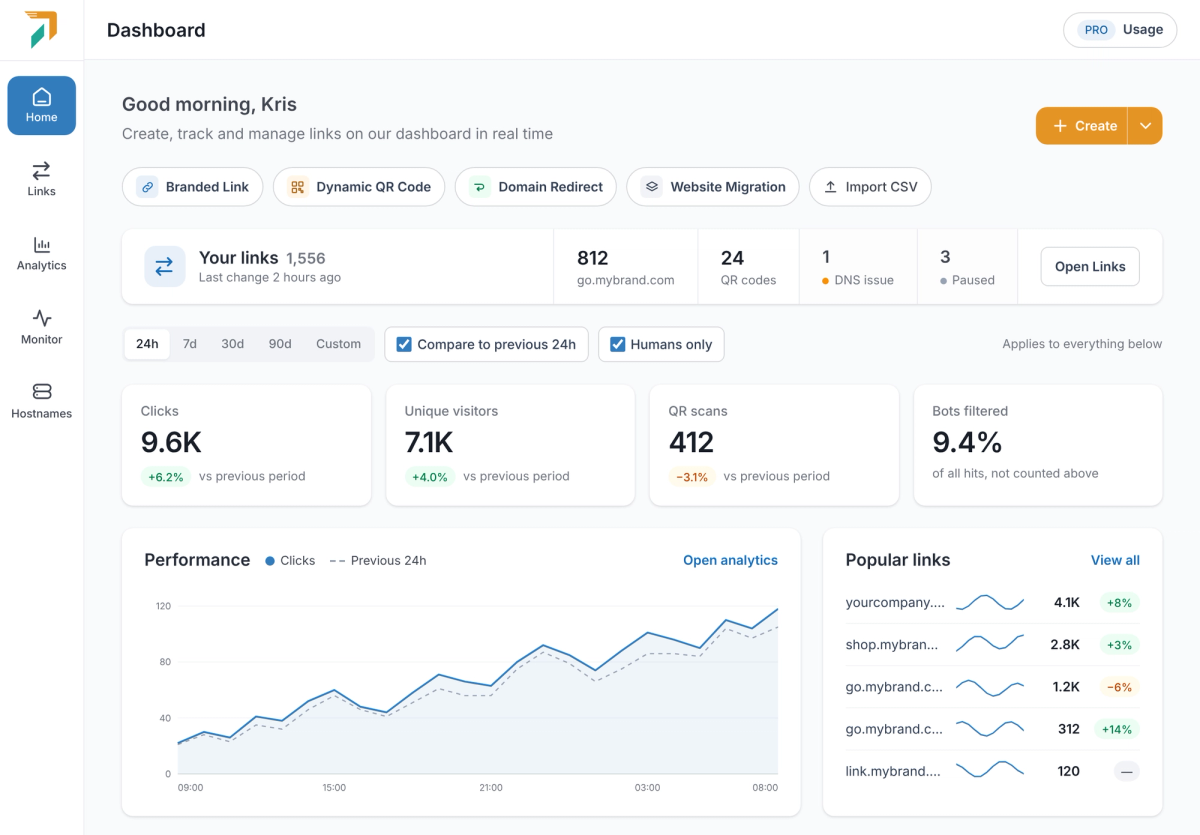
The dashboard shows clicks and unique visitors across all your domains, with bots filtered out, so you can see whether an old domain still sends real visitors before you let it expire.