


A redirect automatically sends visitors and search engines from one URL to another. For SEO, use a server-side 301 (or 308) when a page has moved for good: Google treats it as a strong signal to index the new URL and move ranking signals there. Use a 302 or 307 only when the old URL is coming back. Redirect each old URL straight to its closest new page, avoid chains, and keep redirects in place for at least a year.
Redirects come up whenever a URL changes: a new domain, a site redesign, a merged page, a switch to HTTPS. Done well, visitors never notice and your rankings carry over. Done badly, you lose traffic to broken links, slow chains or the wrong URL in search results. This guide covers what a redirect is, the types you can use, how each one affects SEO, and how to set one up.
What is a redirect?#
A redirect is an instruction that sends anyone who requests one URL to a different URL. It usually happens on the server: instead of returning the page, the server answers with a 3xx status code and a Location header that holds the new address. The browser then requests that address on its own, so the visitor lands on the new page without clicking anything.
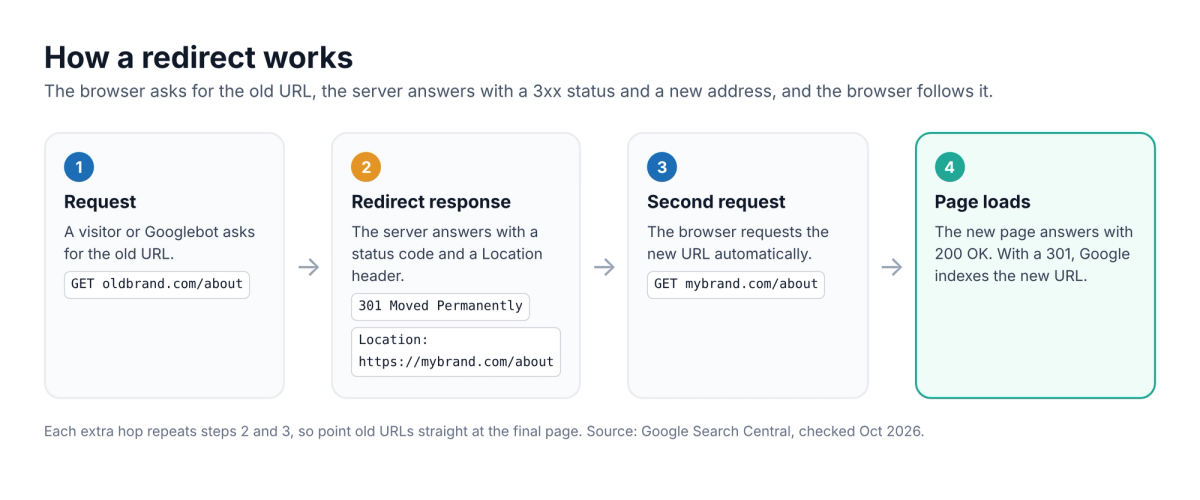
Search engines follow redirects the same way. Googlebot follows up to 10 redirect hops, and the type of redirect tells Google whether to index the old URL or the new one.
Types of redirects#
Redirects fall into two groups. Server-side redirects send an HTTP status code before any page loads. Client-side redirects load a page first and then send the browser on with HTML or JavaScript. Here is how each type works and how Google treats it:
| Redirect | Permanent or temporary | How Google treats it | Use it for |
|---|---|---|---|
| 301 Moved Permanently | Permanent | Strong signal to index the new URL | Domain changes, migrations, renamed or merged pages, HTTP to HTTPS |
| 308 Permanent Redirect | Permanent | Same as 301 | Permanent moves where the request method must stay the same (forms, APIs) |
| 302 Found | Temporary | Weak signal; the old URL usually stays indexed | Maintenance, short campaigns, tests |
| 307 Temporary Redirect | Temporary | Same as 302 | Temporary moves where the request method must stay the same |
| Meta refresh, 0 seconds | Permanent | Read as a permanent redirect | Only when you can't change the server |
| Meta refresh, delayed | Temporary | Read as a temporary redirect | A "we've moved" notice page |
| JavaScript redirect | Permanent | Followed only if Google renders the page, which can fail | Last resort when nothing server-side is possible |
| Frame (URL masking) | Not a redirect | No redirect happens; the destination loads inside your page | Keeping your URL in the address bar |
For most sites the choice is between 301 and 302. Our 301 vs 302 redirect guide goes deeper on that decision, and the 301 redirect guide covers permanent redirects step by step.
Server-side or client-side?#
Use a server-side redirect whenever you can. Google recommends it, it works for every visitor and bot, and it happens before any page content loads. Client-side redirects depend on the browser: a JavaScript redirect only counts if Google renders the page, and Google's own documentation warns that rendering can fail.
How redirects affect SEO#
- •Ranking signals follow a permanent redirect. A 301 or 308 tells Google to index the new URL and consolidate signals there. A 302 or 307 keeps the old URL as the one Google shows.
- •No PageRank is lost in the hop. Google's Gary Illyes said in 2016 that 30x redirects no longer lose PageRank (reported by Search Engine Land). What matters is choosing the right type and the right destination.
- •Relevance matters. A redirect to a closely matching page keeps the visitor and the page's purpose. Sending every old URL to the home page throws away both.
- •Chains cost time. Each hop is another round trip for the browser and another step for the crawler. Point old URLs straight at the final page.
- •Timing matters. Google's site move guide advises keeping redirects as long as possible, generally at least a year, so crawlers and returning visitors see them.
Are redirects bad for SEO?#
No. A redirect is the correct way to tell search engines a URL has changed. Without one, the old URL returns a 404, its links point at nothing, and the new page starts from scratch. Redirects only hurt when they're used badly: a 302 for a permanent move, long chains, loops, or redirects to unrelated pages.
When a redirect helps your SEO#
- •Changing domains: redirect every old URL to its counterpart on the new domain, page by page.
- •Moving or renaming pages: map each old URL one-to-one to its new home instead of sending everything to the home page.
- •Merging pages: when two pages compete for the same search, combine them and 301 the weaker one into the stronger one.
- •Deleting pages: redirect only when a genuinely equivalent page exists. Otherwise let the URL return a 404 or 410.
- •Normalizing URLs: pick one version of each URL and 301 the rest, such as http and https, www and non-www, or with and without a trailing slash.
Which redirects people actually use#
Permanent redirects dominate. Of the redirects set up on RedirHub, about 96 in 100 are 301s, and around one account in seven has set up a 302 at least once (RedirHub platform data, October 2026). If you are unsure which to use, the move is almost always permanent.
SEO redirect best practices#
- •Use a 301 for anything permanent and keep 302s for moves that will be undone.
- •Redirect each old URL to its closest match, not to the home page.
- •Go straight to the final URL: no chains, no loops.
- •Serve HTTPS on the old domain too, so the redirect itself doesn't trigger a browser warning.
- •Update internal links and your sitemap to the new URLs.
- •Keep redirects for at least a year, longer if old links still bring visitors.
- •Test every important redirect after launch.
How to set up a redirect#
On your own server, add one line per redirect. Swap 301 for 302 for a temporary move:
| Where | Example (301) |
|---|---|
| Apache (.htaccess) | Redirect 301 /old-page https://example.com/new-page |
| Nginx (in the server or location block) | return 301 https://example.com/new-page; |
| PHP | header("Location: https://example.com/new-page", true, 301); exit; |
| HTML (meta refresh, last resort) | <meta http-equiv="refresh" content="0; url=https://example.com/new-page"> |
Note that PHP's Location header sends a 302 unless you set the code yourself, as the PHP manual explains, so pass 301 explicitly for a permanent move.
To confirm what a URL returns, run curl -I https://old-url.com and read the status line, or enter it in our redirect speed test to see every hop and how fast it answers.
Is your redirect working?
Enter your domain. You'll see the status code (301 or 302), where it lands, whether HTTPS is valid, and how fast it answers from Washington, Frankfurt and Tokyo, ranked against every redirect tested in the last 7 days.
Test my redirectRedirects without a web server#
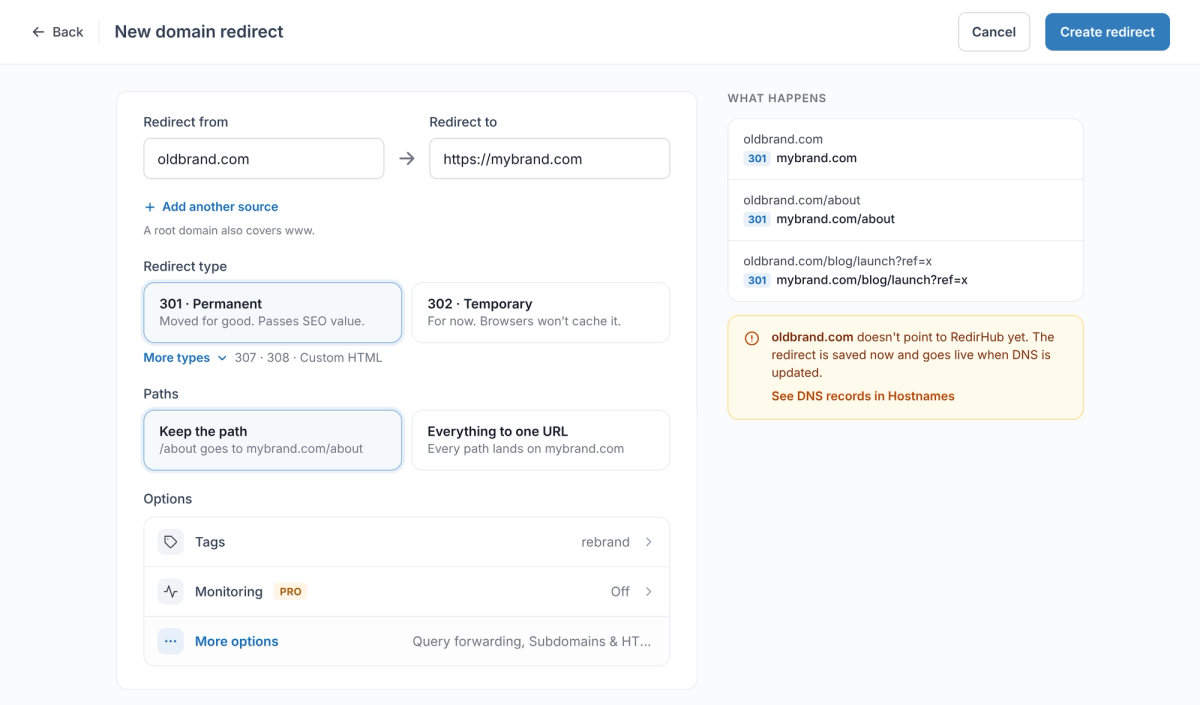
If the old domain has no hosting, or you'd rather not maintain server rules, a redirect service can answer for it. With RedirHub you point the domain's root and www records at RedirHub, choose 301 or 302 under Redirect type, and pick Keep the path or Everything to one URL.
| Server redirect | RedirHub | |
|---|---|---|
| Redirect types | Whatever your server supports | 301, 302, 307, 308 and frame redirects |
| Where it answers | Your server | 130 global edge locations (PoPs), close to each visitor |
| DNS and email | Unchanged | Unchanged; only root and www records change |
| HTTPS | Your certificate | Issued and renewed automatically for root and www |
| Many URLs | Rules you write and maintain | Map each old URL to its own new page; CSV import on every plan |
| Seeing if it is used | Server logs | Clicks and unique visitors with bots filtered out |
| Cost | Included with hosting | From $49/month (Core), 14-day free trial |
If you run your own server and only need a handful of rules, the server is free and enough. RedirHub is worth it when the old domain has no hosting, when you manage several domains, or when you want to see whether old URLs still get visitors.
For a page-by-page migration mapping, upload the list of old and new URLs with a bulk redirect import instead of writing rules by hand. Every connected domain gets free HTTPS certificates, so the redirect works on https:// as well as http://.
Frequently asked questions
A redirect automatically sends visitors and search engines from one URL to another. The server answers the old URL with a 3xx status code and the new address, and the browser loads the new page on its own.
They tell search engines where a page has moved, so the new URL can take over the old one's place in search results and the links pointing at the old URL still count. Without a redirect, the old URL returns a 404 and the new page starts from scratch.
No. Used correctly, a redirect protects your rankings when a URL changes. Problems come from the wrong type (a 302 for a permanent move), redirect chains, loops, or redirects to unrelated pages.
Server-side redirects (301, 308, 302, 307) send an HTTP status code. Client-side redirects use a meta refresh tag or JavaScript after the page starts loading. For SEO, server-side 301 and 302 are the ones you'll use most.
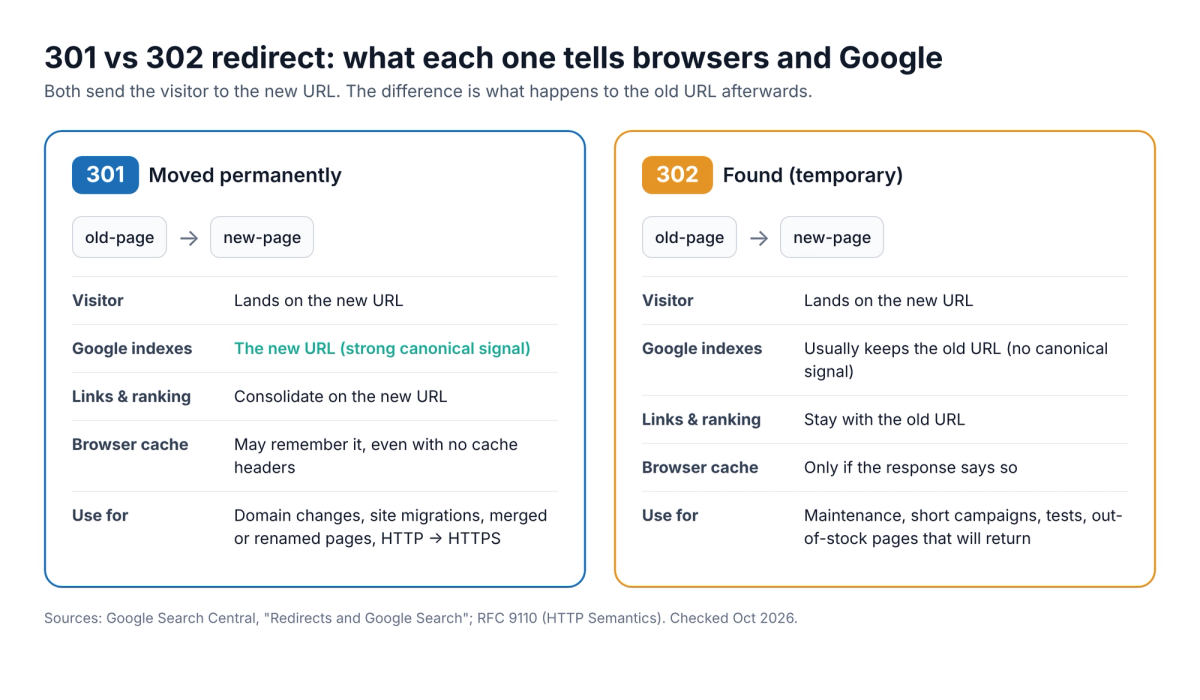
A 301 is permanent: Google indexes the new URL and moves ranking signals there. A 302 is temporary: Google usually keeps the old URL indexed. Visitors land on the new URL either way.
They slow things down. Each hop is another round trip, and Google's crawlers follow at most 10 hops. Redirect old URLs straight to the final page.
Only as a last resort. Google can follow them only when it renders the page, and rendering can fail. Use a server-side 301 whenever you can.
Google advises keeping redirects for site moves as long as possible, generally at least a year. Many sites keep them indefinitely so old links and bookmarks keep working.
RedirHub serves 301, 302, 307, 308 and frame redirects for domains you point at it, without a web server. It issues HTTPS automatically, can keep the path or map each old URL to a new page, and shows clicks per redirect.

TC is the Operations Manager at RedirHub, leading the company’s operational strategy and execution to ensure reliable, scalable redirect infrastructure. He oversees internal processes, cross-team coordination, and platform readiness while supporting customers through complex redirect implementations. With a strong understanding of large-scale domain operations and real-world edge cases, TC plays a key role in aligning product and customer success to deliver stable, high-performance redirection solutions.