


MCP is a shared protocol for connecting AI applications to tools and data through hosts, clients, and servers. It can make integrations reusable across compatible clients, but each server still needs deliberate permission design and maintenance. Start with read-only tools, require review for high-impact changes, keep an audit trail, and test against the exact client and server versions you plan to run.
The Model Context Protocol (MCP) is an open standard that lets AI applications discover and call external tools, data, and systems through a host-client-server architecture. If you've asked an assistant to create a branded link or check a redirect and found it can't safely reach your link platform, MCP is a way to connect that conversation to real operations.
The missing piece isn't another AI model. It's a shared way for an AI application to find available capabilities, send structured requests, and receive results from systems your team already uses. Without that layer, an assistant may explain how to check a redirect but can't check it.
For marketers, developers, and IT teams, MCP is worth considering when an AI application needs repeatable access to business tools. A team that only wants answers from a document may not need an MCP server; a team that wants an assistant to inspect, update, or monitor live systems may. For a useful primer on how servers can connect agent workflows to publishing tools, see PostPulse's guide to an MCP server for agent publishing.
Why an AI Assistant Needs a Way to Reach Your Tools#
A campaign manager asks an AI assistant to make a short branded link for a new landing page, add a campaign tag, and check that the destination works. The assistant can draft the link name and explain what to verify, but it has no authorized connection to the company's link platform. The marketer is left switching tabs and doing the operational work by hand.
That gap appears across marketing and IT. A DevOps teammate might ask an assistant to check redirect health after a site migration, while an SEO lead wants to compare old and new destination rules. The assistant needs more than a model that can understand the request. It needs a safe, predictable route into the systems that hold the relevant data and perform the requested action.
MCP provides that route as an open connector standard, not as a model, an AI product, or a replacement for the systems being connected. Anthropic open-sourced MCP on November 25, 2024, with a design in which servers expose data or capabilities and clients in AI applications connect to those servers (Anthropic's introduction to MCP). The initial release included the protocol specification, software development kits, local server support in Claude Desktop, and open-source server implementations.
The practical benefit is a common interaction pattern. Rather than building a separate, bespoke connector for every AI product, a team can expose capabilities through an MCP server and let compatible clients discover and invoke them. In a link workflow, that could mean an assistant finding tools for link creation, redirect checks, or analytics rather than trying to operate a dashboard by imitating a person's clicks.
The rest of the decision is about scope and risk. If an assistant only needs to answer general questions, a connection to operational systems may add unnecessary exposure. If it needs to take actions or retrieve current data, MCP offers a standardized connection, but your team still has to decide which capabilities the server exposes and what safeguards govern their use.
The Client, Host, and Server Architecture Explained#
MCP has three roles. A host is the AI application, a client is the connector inside that application, and a server exposes capabilities from a tool or data source. Keeping those roles separate makes it easier to understand what's happening when someone asks an assistant to check a redirect.
The restaurant analogy helps. The host is the dining room where the customer places an order. The client is the waiter who carries the request and brings back the response. The server is like a kitchen that knows its own menu and prepares what was requested. In MCP, the server doesn't need to know every AI application that might connect to it.
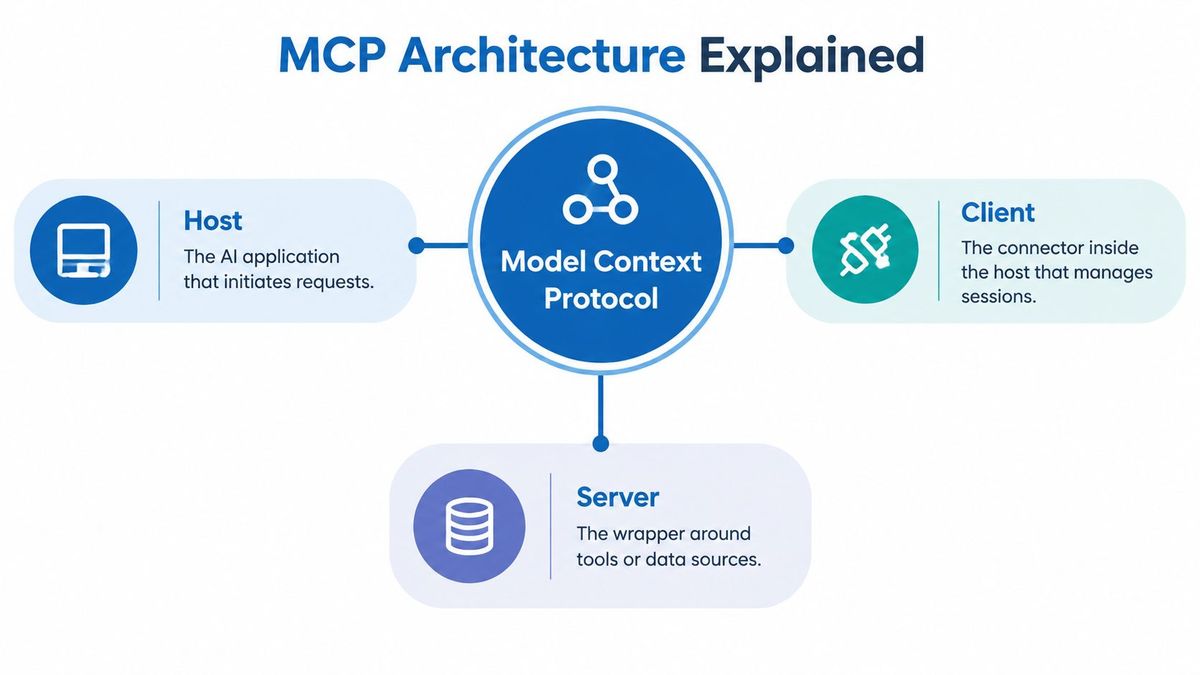
In a link workflow, the user makes a request in the host, such as an AI chat or development environment. The host's client connects to a link-management MCP server, which can call the relevant underlying service. The server returns a structured result, and the host turns that result into a useful response.
MCP messages use JSON-RPC 2.0, a format for requests and replies. When a host connects, the client and server negotiate protocol versions and capabilities. This is like checking the menu and confirming the kitchen can fulfill an order before sending it. A link server might declare that it supports creating branded links and reading redirect status, while not offering bulk deletion.
MCP capabilities commonly include:
- •Tools, which perform actions, such as creating a link or checking a destination.
- •Resources, which provide information for the application to use, such as a read-only view of redirect rules.
- •Prompts, which offer reusable workflow templates, such as a guided campaign-link setup.
- •Notifications, which can alert a client that relevant information has changed.
A host can create multiple isolated client connections, and each client communicates with one server. That lets an AI application combine capabilities from several systems without requiring every service to use a custom plugin format. Under the stateless core of the 2026 specification, each request must include the information needed to process it. The server shouldn't assume that it can recover application state from earlier requests on the same connection. For operators, that separation supports distributing requests across service instances, while authentication and business transaction state remain responsibilities that must be handled outside the protocol itself.
How MCP Compares to APIs, Plug-ins, and Function Calling#
MCP isn't a replacement for APIs. A link platform's MCP server may call existing APIs behind the scenes, while presenting capabilities in a way an MCP client can discover and use. The distinction is where the reusable interface sits: an API serves software integrations generally, while an MCP server packages relevant capabilities for compatible AI applications.
A bespoke API integration often requires a developer to build and maintain application-specific code. A traditional plug-in can be convenient, but its interface may be tied to a particular host. Function calling gives a model a way to request a function call, but that alone doesn't define a shared server protocol for connecting multiple clients to external capabilities. MCP standardizes discovery and interaction between clients and servers; it doesn't make every implementation automatically interchangeable or secure.
| Pattern | Discovery | Reuse across AI clients | Governance overhead |
|---|---|---|---|
| Bespoke API integration | Usually configured in application code | Requires additional work for each client | Team defines and maintains its own controls |
| Host-specific plug-in | Typically managed by the host | Often tied to the plug-in's supported host | Depends on host and plug-in controls |
| Function calling | Functions are defined for a model or application | Reuse depends on each implementation | Application must govern available calls |
| MCP server | Client can discover declared capabilities | A compatible server can serve compatible clients | Team still scopes, authenticates, and audits access |
The specific value of MCP is reusability through a common interaction model. A team can expose a set of link operations once, then make them available to compatible AI clients instead of rebuilding the same connector for every product. That doesn't mean a server will work with every client without testing: clients and servers still need compatible versions, supported capabilities, and working authorization.
For example, a server might expose a check_redirect tool with a defined input and response, while the underlying platform continues to use its existing service APIs. Developers comparing available link operations can consult the RedirHub API reference as an example of the API layer that an MCP integration may complement rather than replace.
Real Workflows You Can Build with an MCP Server#
The visible experience of an MCP workflow is a conversation. Underneath it, the host selects a tool, the client sends a structured request, and the server returns a result. A person can then review the result or approve an action, depending on what the tool is allowed to do.
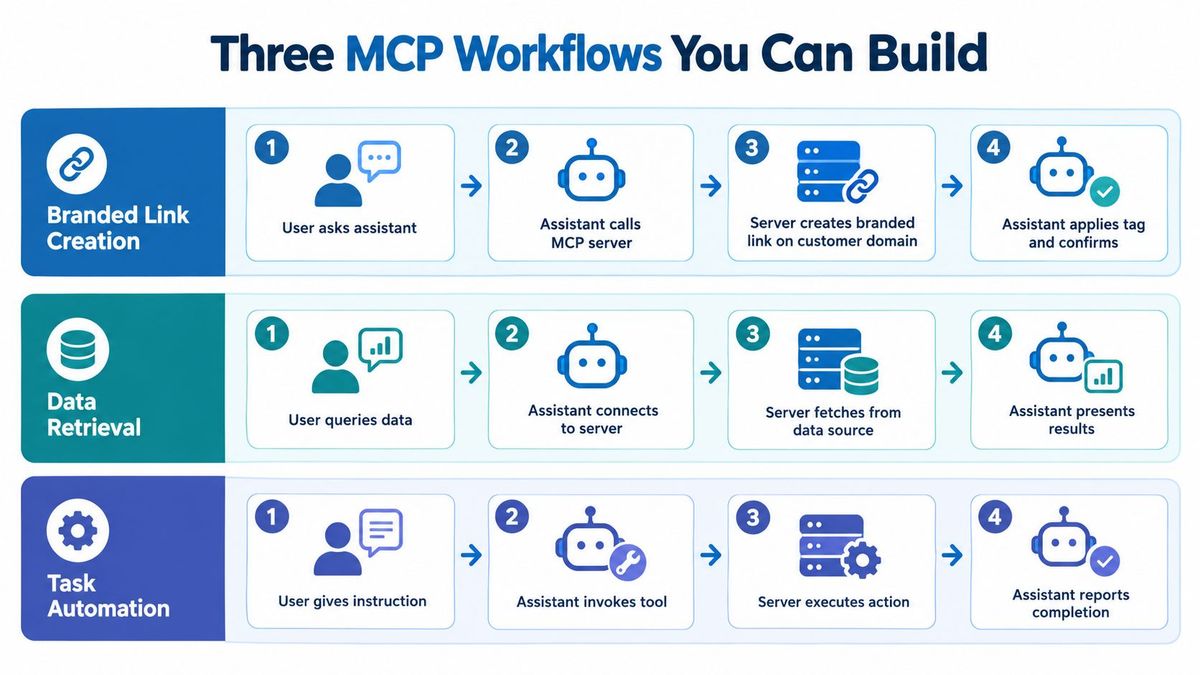
Creating a branded link: A marketer asks for a link on the company's domain, gives the destination and campaign tag, and asks the assistant to confirm where it leads. The assistant can call a tool to create the link, then another to inspect the result. The server returns structured details for the assistant to present. A human should review the destination and any durable change before publication if the operation can affect a live campaign.
Checking redirect health: An operations teammate asks for a health check across a group of campaign links. The assistant calls a read-oriented tool, the server checks the requested destinations, and the response identifies any failures for the assistant to summarize. A report can help a person focus on the exceptions, but it shouldn't rewrite live routing rules on its own.
Reviewing analytics: A marketer asks for click or QR scan data and follows up with questions about the results. The assistant requests the relevant analytics from the server, receives structured data, and answers using that response. The team should define which workspaces or campaigns the user is allowed to query before making analytics available through the server.
These examples show why MCP workflows need careful tool design. A read-only analytics tool and a tool that changes a live destination aren't equivalent permissions, even if a user can request both in ordinary language. For another illustration of how MCP can connect an assistant to a specialized publishing workflow, see Scribiz's YouTube automation setup.
The Governance Question Most Explainers Skip#
An MCP server isn't just a connector. It can become a privileged automation identity, with the ability to read operational data or make changes in systems that matter. The official specification treats tools as arbitrary code execution, says tool descriptions should be considered untrusted unless they come from a trusted server, and requires explicit user consent before data access or tool invocation (MCP specification).
That matters for redirect management. A conversational request to point an established branded link at a different destination might sound routine, but the change can affect campaign traffic, search visibility, and customer experience. The assistant's friendly interface doesn't reduce the impact of an incorrect destination or an overly broad permission.
Before connecting a production system, establish controls for the identity and actions behind the server:
- •Limit permissions: Give each server access only to the tools and data it needs.
- •Require review: Ask for human approval before destructive or high-impact changes.
- •Keep an audit trail: Preserve records of tool calls, results, and changes so teams can investigate what happened.
- •Separate environments: Test against staging before making production capabilities available.
- •Validate destinations: Check proposed link targets and redirect behavior before applying changes.
- •Revoke access promptly: Make it possible to disable credentials and server access quickly when needed.
These controls are more than a checklist for security teams. They help product owners distinguish a safe read operation from a consequential write operation. They also give marketers and operations staff clarity about which actions an assistant can complete on its own and which require an explicit confirmation.
The protocol itself doesn't decide your organization's approval rules, review process, or access policy. Those decisions belong to the team deploying the server. RedirHub describes security and access information on its security page, which teams can use alongside their own review of how an integration handles permissions, credentials, and change history.
How RedirHub’s MCP server handles these controls#
RedirHub’s MCP server lives at https://mcp.redirhub.com. As published in our product facts on October 18, 2026, assistants sign in with OAuth (API tokens also work), and bulk link updates and deletes made through MCP return a dry run first and apply only after the change is confirmed. The server is available on Core, Pro and Enterprise; setup steps for Claude, ChatGPT and Cursor are on the RedirHub MCP page.
We also ran a check anyone can repeat. On October 20, 2026 (UTC), an unauthenticated initialize request sent to the server returned HTTP 401 with a WWW-Authenticate: Bearer header pointing to its OAuth protected-resource metadata. That metadata lists separate scopes for reading and writing: links:read, links:write, links:delete, domains:write and workspace:admin. Read access and write access are different grants, as the controls above recommend. To repeat the check:
curl -i -X POST https://mcp.redirhub.com \
  -H 'content-type: application/json' \
  -H 'accept: application/json, text/event-stream' \
  -d '{"jsonrpc":"2.0","id":1,"method":"initialize","params":{"protocolVersion":"2025-06-18","capabilities":{},"clientInfo":{"name":"test","version":"1"}}}'
Then open https://mcp.redirhub.com/.well-known/oauth-protected-resource to read the scopes.
Version Compatibility and Transport Evolution#
MCP has evolved quickly, so “supports MCP” doesn't answer every implementation question. Anthropic introduced the protocol publicly in November 2024. The project reported that its current specification release was issued in November 2025, followed by a 2026 revision (2026-07-28) that introduced a stateless protocol core, multi-round-trip requests, header-based routing, cacheable list results, authorization hardening, and a formal extensions framework (MCP project roadmap and release posts).
The transport and session model affect how an integration behaves in production. Moving toward a stateless core changes what servers and gateways can assume about session continuity. Teams need to consider how requests are routed, how retries behave, and what logs must capture to trace a call. A stateless design can fit ordinary HTTP infrastructure, but it doesn't remove the need to manage authentication, idempotency, or application-level transaction state.
Authorization has also changed across recent revisions. The shift away from Dynamic Client Registration toward Client ID Metadata Documents affects how clients identify and register with servers. For an organization, the practical question isn't just whether authentication works during a demo. It's whether the client, server, gateway, and identity setup agree on the authorization flow the deployment uses.
Before production, test these points against the exact client and server versions you plan to run:
- •Tool schemas: Confirm that names, arguments, and response formats match expectations.
- •Authentication: Exercise the full login and authorization flow, including failure and revocation.
- •Retries and idempotency: Verify that a repeated request won't create duplicate links or repeat an unsafe change.
- •URL handling: Check that path and query parameters survive redirect operations.
- •Bulk work: Test import, export, and batch behavior on representative data.
- •Errors and rollback: Confirm that failures are understandable and schema changes can be reversed safely.
MCP can reduce duplicated connector work, but it doesn't eliminate integration lifecycle management. Build compatibility testing into release planning, especially when a server supports actions that can change live links, redirect rules, or migration mappings.
A Practical Deployment Checklist#
A workable deployment begins with a narrow contract: decide which capabilities the assistant needs, and leave everything else unavailable. For a first link-management workflow, that might mean reading redirect status and analytics before exposing tools that edit destinations or bulk-update rules.
Then settle the operational details with the teams that own the systems and risks:
- Choose the first tools. Write down each tool's purpose, inputs, output, and whether it reads or changes data.
- Design authentication. Select an approach that fits the clients and policies in your environment, and document how access is granted and revoked. Teams assessing token-based access can review RedirHub's API token guidance.
- Plan observability. Record tool calls and outcomes in structured logs; decide how the team will notice errors, slow responses, and unusual activity.
- Set operating limits. Define rate limits and separate staging capabilities from production permissions.
- Prepare a rollback. Document how to disable the server or reverse a schema or workflow change if testing reveals a problem.
| Control area | Minimum viable | Enterprise ready |
|---|---|---|
| Scope | A small, documented set of tools | Role-based scopes reviewed across teams |
| Authentication | Protected credentials with a revocation path | Central identity integration and managed credential lifecycle |
| Observability | Logs for calls and errors | Centralized monitoring, reviewable history, and alerting |
| Environments | Separate test and production access | Managed promotion and approval processes |
| Change recovery | A documented disable or rollback procedure | Tested rollback and change governance |
Produce a tool inventory, access design, test plan, logging requirements, and rollback instructions before launch. Include the system owner, security reviewer, and people who will use the assistant in the deployment review.
Key Takeaways and Common Questions#
MCP is a shared protocol for connecting AI applications to tools and data through hosts, clients, and servers. It can make integrations reusable across compatible clients, but each server still needs deliberate permission design and maintenance. Version changes and ecosystem governance remain important parts of operating it.
Who maintains MCP today? Anthropic donated MCP to the Agentic AI Foundation on December 9, 2025, moving it toward vendor-neutral governance under the Linux Foundation. The foundation was co-founded by Anthropic, Block, and OpenAI, with support from Google, Microsoft, Amazon Web Services, Cloudflare, and Bloomberg (Linux Foundation announcement).
How should a small team assess an off-the-shelf server? Review its source, permissions, authentication, tool descriptions, and update process. Test it with non-production data and keep its capabilities limited until the team understands its behavior.
How long does adoption take? There isn't one reliable timeline for every deployment. The work depends on the systems involved, the authentication model, and the approvals required; a narrow read-only pilot is easier to evaluate than a production server that can make changes.
Does MCP replace existing API investments? No. An MCP server can expose selected operations from existing APIs to compatible AI clients, while the APIs remain useful for other applications and workflows.
RedirHub provides branded links, dynamic QR codes, redirects, analytics, monitoring, and an MCP integration for connecting compatible AI applications to link workflows. If your team is evaluating MCP for link operations, visit RedirHub to explore how those capabilities fit alongside your existing API and governance practices.
Connect your AI assistant to your redirects
Point Claude, ChatGPT or Cursor at the RedirHub MCP server to check redirects, create links and read analytics. Core and Pro come with a 14-day free trial.
See the MCP serverFrequently asked questions
MCP is an open standard that lets AI applications discover and call external tools, data and systems. A host, the AI application, runs a client that connects to a server, and the server exposes tools, resources and prompts. Anthropic open-sourced it on November 25, 2024.
It can read and manage the workspace, its members, domains, links and QR codes, count links, read analytics and access logs, and trace any URL’s redirect chain. On Pro it can also show a link’s change history.
The server is at https://mcp.redirhub.com. Assistants sign in with OAuth, and API tokens also work. The AI assistants page in the dashboard shows the server URL and setup steps for Claude, ChatGPT, Cursor and other MCP clients.
No. Bulk link updates and deletes made through RedirHub’s MCP server return a dry run first and apply only after the change is confirmed.
The MCP server is available on Core, Pro and Enterprise. Core and Pro each come with a 14-day free trial, and Enterprise is set by contract.

Leo Astarothman is the Brand & Content Lead at RedirHub, where he shapes the company's visual identity, educational content, product experiences, and marketing strategies. He also specializes in system design. Simplifying complex redirect infrastructure into practical resources, product experiences, and campaigns that help businesses understand and adopt modern redirect management.